
The Short Answer
Ghotly AI 4.2.0, released on 8 November 2026, is a free update for the Windows app. It hears the interviewer sooner and gets more of their words right, starts the answer about a second after they stop speaking, and never drops a question that is asked while an answer is still being written. It also adds region select, Glance, other readings of a misheard question and a keyboard shortcut for every action.
It includes every fix that was planned for 4.1.4, which was not released on its own: fewer answers that fail when a provider is busy or out of quota, a Copy button that works, and a cleaner, see-through panel.
To get it, open the app, let the update download, then close the app so it installs. Or download the installer from the Download page.
Faster, More Accurate Speech-to-Text
- Deepgram Nova-3. The app now uses Deepgram's newer Nova-3 model. If your Deepgram account cannot use it, the app switches to Nova-2 by itself.
- Your interview as key terms. Before it listens, the app gives Deepgram the company and position from Interview Setup, the skills in your Profile and common technical names such as Kubernetes, Kafka and PostgreSQL, so names like these come out right more often.
- Less to upload. The call audio is sent at 16 kHz, about a third of the data the app sent before, so the words arrive sooner on a slow connection that also carries your video call.
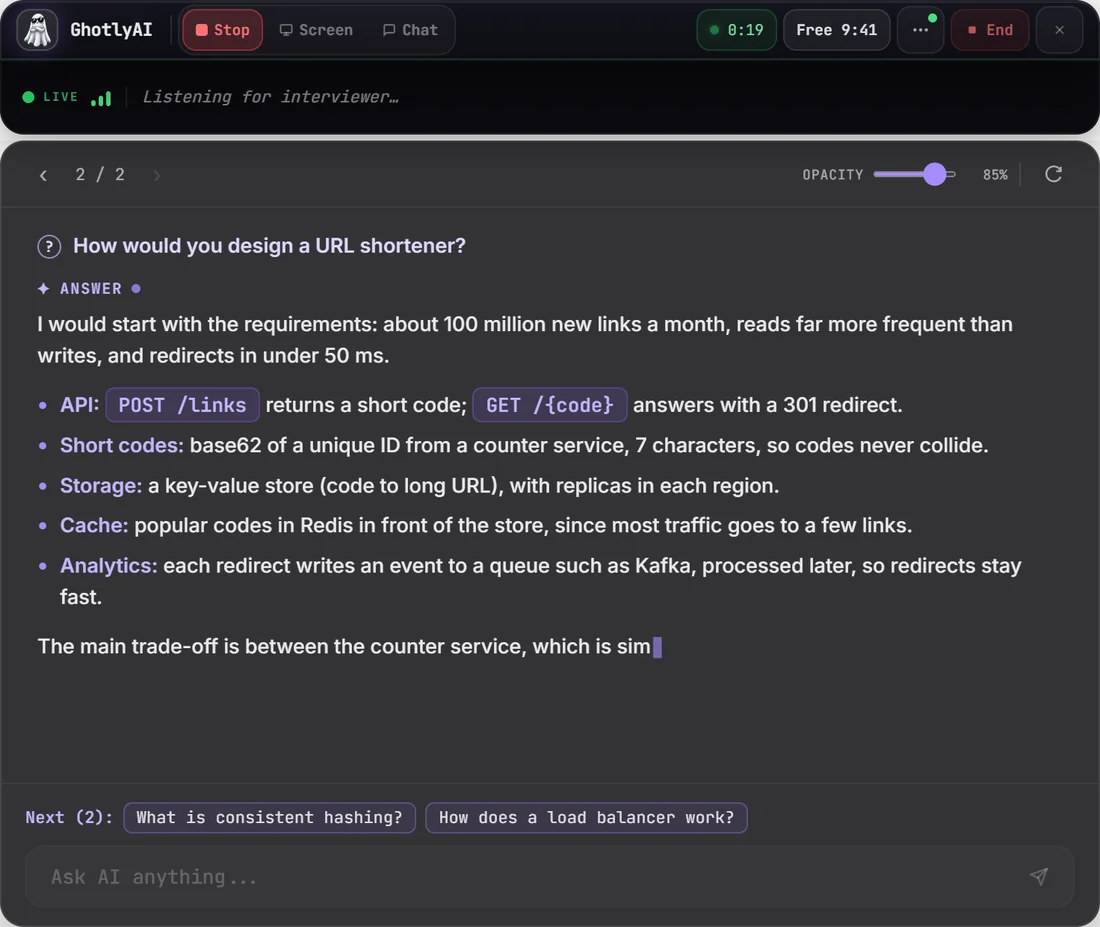
- Sooner answers. The answer starts about a second after the interviewer stops speaking, and sooner when what they said ends as a question.
- Reconnecting. If the connection to Deepgram drops, the window says "reconnecting" and carries on when it is back.
Fill in the company, the position and your skills before the interview: the key terms are made from them.
Answers That Keep Up With the Interview
| In the interview | What Ghotly AI 4.2.0 does |
|---|---|
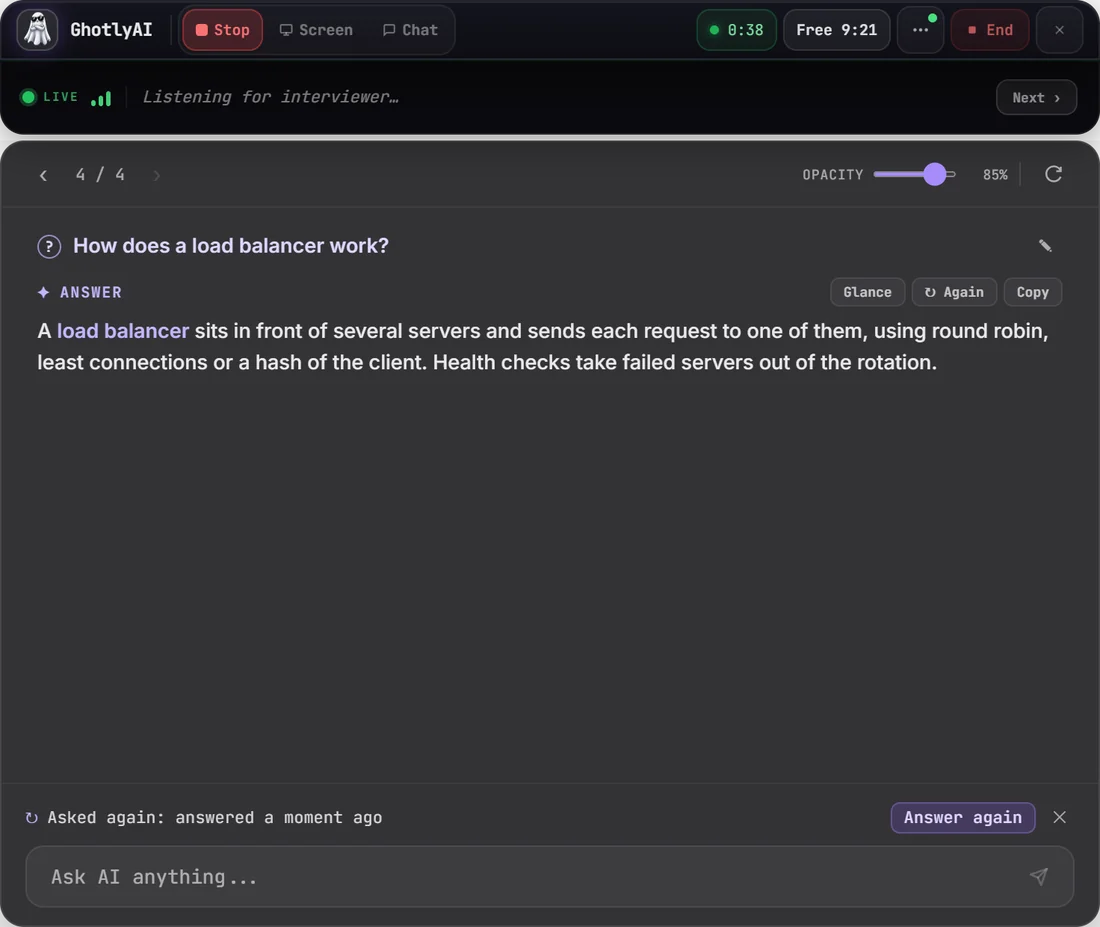
| A new question while an answer is still being written | It waits under the answer (Next) and is answered next; click it to answer it at once |
| "Okay", "right", "thank you", "Can you hear me?" | Not answered |
| A short question: "Why?", "Explain JWT", "SQL vs NoSQL?" | Answered |
| The same question asked again | "Asked again" with an Answer again button, not a second answer |
| A question cut in two by a pause | Put back together and answered as one |
| You speak too | With "Also listen to my microphone" on, your words are context for the next answer; they never start one |
| You press Stop | What was heard stays on screen and is answered |
Want to read without new answers arriving? Press Ctrl + Shift + Space to pause Auto answer: questions wait, and Ctrl + 0 (Send) answers them when you are ready.
Clearer Answers
- The question is shown above its answer, so you always know what is being answered.
- When the words could have been heard differently, Or did they ask: offers the other readings. Click one, or press Ctrl + Alt + 1, 2 or 3.
- ✎ next to the question lets you correct a misheard word, and the corrected question is answered.
- Again answers the same question once more. Glance (Ctrl + Shift + G) shows the answer as key points, numbered steps or a table.
- Copy code (Ctrl + Alt + C) copies the answer's code, or the whole answer when it has none.
- The answer uses the full width of the panel, wide tables scroll inside it, and it no longer jumps to the bottom while you scroll up to read.
Screen Answers and Region Select
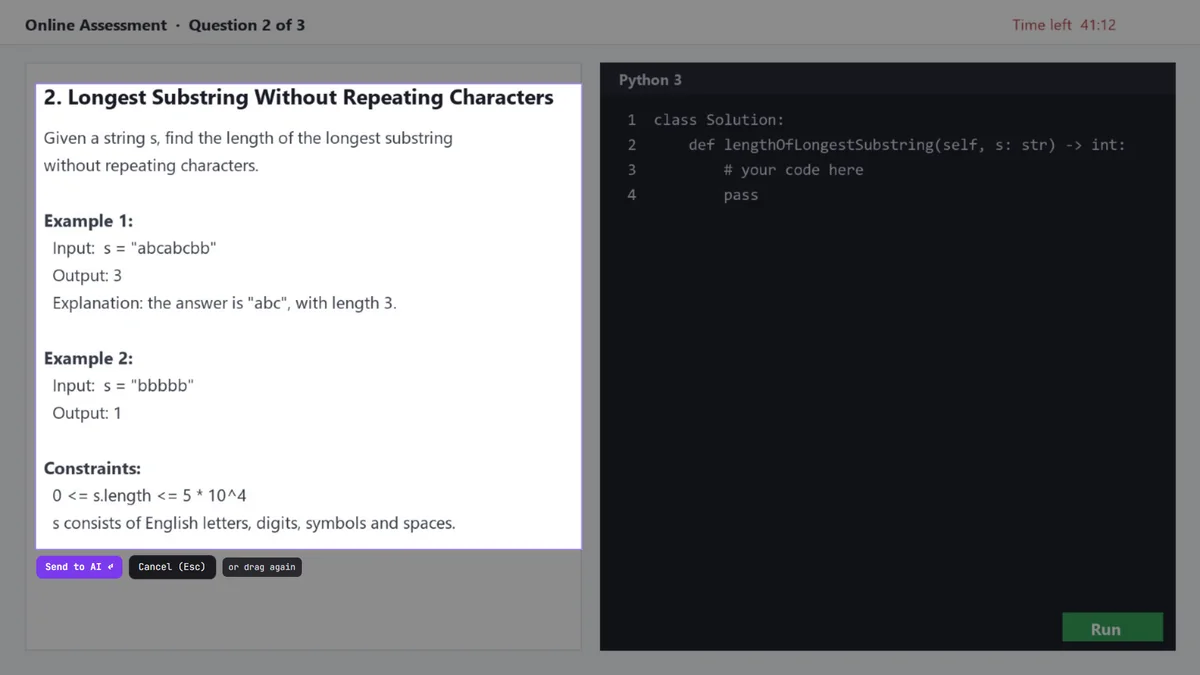
- Select a region (Ctrl + Shift + X). The screen freezes; drag over just the question and press Send, or Enter. Esc cancels. Only that part is sent, so the AI reads the question and nothing else.
- Screen answers find the question. Ctrl + E now looks for the question on the screen, in a video's captions or title, and in what the interviewer has just said, so a question asked out loud is answered with the screen as its context.
- A screenshot only goes to a model that can read images (for example Gemini), and Ctrl + E and Ctrl + Enter no longer stop at "No screenshots yet".
A Keyboard Shortcut for Everything
Ghotly AI now has 18 global shortcuts. These are new in 4.2.0:
| Keys | Action | What it does |
|---|---|---|
| Ctrl + Shift + A | Start / stop listening | The AI Answer button: starts listening to the call; pressed again it stops and answers what was heard. |
| Ctrl + Shift + X | Select a region | Freezes the screen; drag over just the question, then Send (or Enter). Esc cancels. |
| Ctrl + Shift + Space | Pause auto answer | Pauses or resumes Auto answer. Paused, questions wait and Send answers them. |
| Ctrl + Shift + G | Glance view | Shows the answer as key points, numbered steps or a table, and back. |
| Ctrl + Alt + C | Copy answer code | Copies the answer's code (or the whole answer when it has none), ready to paste. |
| Ctrl + Shift + Backspace | Clear answer | Clears the answer from the screen (it stays on its page). |
| Ctrl + Shift + Y | Quick chat | Opens Chat with the cursor in its box, to type a question. |
| Ctrl + Alt + M | Mute my mic | Mutes or unmutes your own microphone, when "Also listen to my microphone" is on. |
| Ctrl + Shift + C | Collapse / expand | Shrinks the window to the small logo, and back. |
| Ctrl + Shift + Q | Quit now | Saves the interview so far to History, then quits. |
Every shortcut can be changed in Settings > Shortcuts: click one, then press the new keys, and Reset all puts the defaults back. The new shortcuts never take a key you had already set, and holding a key down does its action once. The full list is on the Keyboard shortcuts page.
The Window
- It comes back where you left it, and never off-screen when a monitor is unplugged.
- It fits down to 400 px wide: the top bar hides its labels as the window narrows.
- One compact top bar with a ⋯ menu, and the question and answer sit straight on the panel.
- Only the panel's background is see-through: the Opacity slider no longer fades the text.
- Settings > More > Appearance: Dark glass, Light glass or High contrast, an accent colour, the answer's text size and a compact panel. The app's own screens follow the theme.
- Settings > More > Screen sharing: choose whether Windows leaves the window out of screen sharing (on by default) and test it, and show the window in the taskbar if you like.
- Quitting (Ctrl + Shift + Q) saves the interview so far to History.
Also in 4.2.0: The Fixes Planned for 4.1.4
| The problem | What happens now |
|---|---|
| A free daily limit (for example Gemini's) stopped the answer | The app moves on to another saved key, also with Auto-switch off |
| "Gemini is busy right now" | It asks again after 2 seconds, then another saved key answers |
| A backup key with no credits was the only error you saw | That key is passed over and named |
| "Too long for Groq's free limit" | The question is answered with the start of your resume and your instructions |
| An Anthropic key made outside a workspace failed | The answer and the key test explain what to change |
| "Grok API error:" with no text, or a slow model that timed out | Grok's errors are readable, and a slow model's message names a faster one |
| The Copy button did nothing | Copy works, and the question text can be selected |
| No sign whether sound was coming in | While listening, the window shows whether sound comes in and from which device, and why when it cannot listen |
| An empty box while the answer was on its way | The card says which provider is thinking, and offers another key when it is slow |
| Markdown marks (asterisks) while an answer was written | The answer is shown formatted as it is written |
| The live transcript was one long line | Two lines with the newest words at the end; a click shows all of it |
| A missing key | Its message has a Settings button |
| Moving the window with Ctrl + Arrow changed its size | It never does |
How to Update
- Open Ghotly AI. It looks for updates when it starts and downloads the new version.
- Close the app. The update installs when it closes.
- Open it again. The version next to the name on the Home screen should say v4.2.0.
Apps on version 4.1.1 or older still fetch updates from GitHub, which can be slow on some Indian networks. For those, the quickest way is the installer on the Download page.
The installer is not code-signed yet, so Windows SmartScreen may warn you the first time. Choose More info, then Run anyway. Each version's SHA-256 is on the Download page if you want to check the file.
For every feature with screenshots, step by step, see the How-to guide.
What This Update Does Not Change
- The app still runs on 64-bit Windows 10 and 11 only.
- The price stays ₹79 a month after 10 free minutes.
- You still bring your own AI and Deepgram keys, and they stay on your PC. Deepgram bills Nova-3 at its own per-minute price, so check Deepgram's pricing if you pay for it.
- Payments are unchanged: cards from outside India are not accepted yet.
Common Questions
What is new in Ghotly AI 4.2.0?
Faster and more accurate speech-to-text with Deepgram Nova-3, answers that start about a second after the interviewer stops, an answer queue that never drops a question, region select, Glance, other readings of a misheard question and a keyboard shortcut for every action. It was released on 8 November 2026.
Is the Ghotly AI 4.2.0 update free?
Yes. The update is free for every account, and it does not change your plan or price.
Why are the interviewer's words more accurate in 4.2.0?
The app uses Deepgram's Nova-3 model and gives it key terms from your interview: the company, the position, your skills and common technical names. Fill these in on the Interview Setup page and in your Profile before the interview.
Does Ghotly AI 4.2.0 answer every question?
It answers each question once, in the order it was asked. Questions asked while an answer is being written wait under it, small talk such as "okay" or "thank you" is skipped, and a repeated question shows Answer again instead of a second answer.
What are the new keyboard shortcuts in Ghotly AI 4.2.0?
Ctrl + Shift + A listens or stops, Ctrl + Shift + X selects a region, Ctrl + Shift + Space pauses Auto answer, Ctrl + Shift + G shows Glance, Ctrl + Alt + C copies the code, Ctrl + Alt + M mutes your microphone, Ctrl + Shift + Y opens quick chat, Ctrl + Shift + C collapses the window, Ctrl + Shift + Backspace clears the answer and Ctrl + Shift + Q saves and quits.
How do I update Ghotly AI to 4.2.0?
Open the app and let the update download, then close the app so it installs. You can also download the installer from the Download page at ghotlyai.in.
Does Deepgram Nova-3 cost more?
Deepgram sets the price per minute of each model, and you pay it with your own key, so check Deepgram's pricing page. If your account cannot use Nova-3, the app uses Nova-2.
Is Ghostly AI the same as Ghotly AI?
Yes. Ghotly AI is the current name of the app at ghotlyai.in. Older posts and the installer file still say Ghostly.